Cannot complete Azure Repos integration due to missing permissions?
You try to integrate Azure Repos with DevStats, but the integration doesn’t complete or no repositories/data appear.
Cause
The user performing the integration does not have sufficient permissions in the Azure DevOps organization. Specifically, they are not a member of the Project Collection Administrators group, which is required for the integration to work properly.
Fix
Add the user who is performing the integration to Project Collection Administrators.
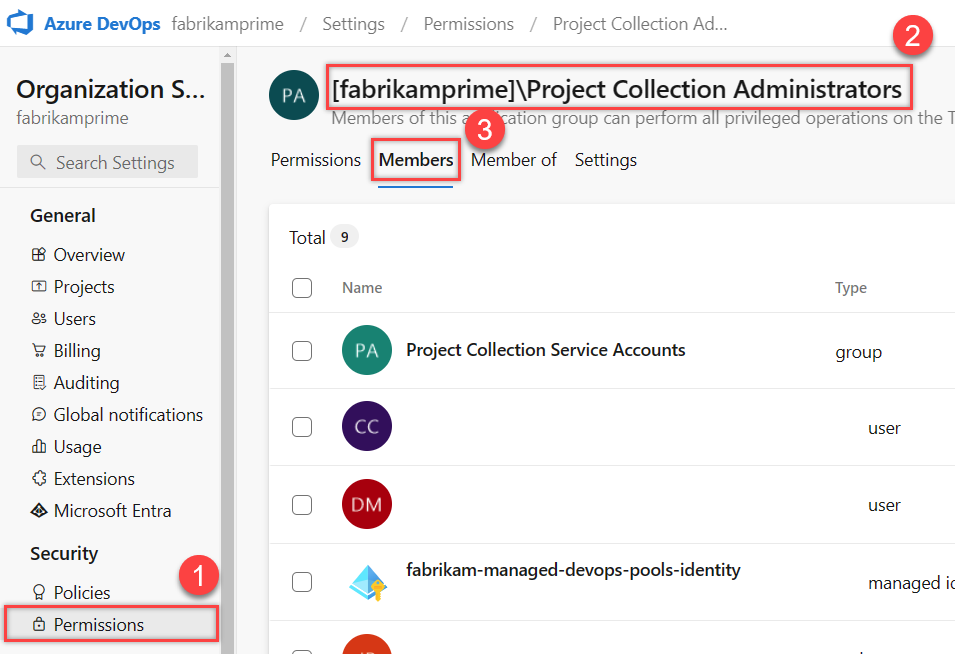
Steps:
- Go to Organization Settings in Azure DevOps
- Open Permissions
- Select Project Collection Administrators
- Go to the Members tab
- Click Add
- Add the user who is doing the integration.
- Click Save
Once the permission is applied, retry the integration, it should work immediately.
Integration stuck or failing due to disabled repositories
Cause:Integrations do not support disabled repositories.
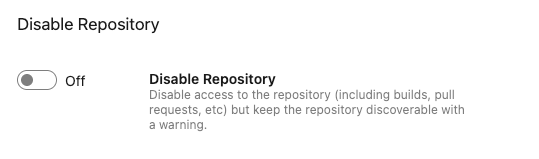
If a repository is disabled via the Azure Repos UI, it may still appear visible, but API endpoints are not accessible, causing the integration to fail or remain blocked.
Fix:Ensure that all repositories involved in the integration are enabled and accessible in Azure Repos.
Steps:
- Go to Project Settings in Azure DevOps
- Scroll down to the Repositories section
- Open Repositories
- Select the repository used in the integration
- Open the repository Settings
- Check the Disable repository switch
- If the repository is disabled, toggle the switch to enable it
- Save the changes (if applicable)
- Retry the integration in DevStats
Once the repository is enabled, retry the integration.