What are Incidents?
In DevStats, an incident represents a critical production failure that required immediate remediation, such as a hotfix or a service disruption. Tracking incidents accurately is essential for calculating two key DORA metrics: Mean Time to Recovery (MTTR) and Change Failure Rate (CFR).
How It Works
DevStats captures incidents through five methods that can be used independently or combined:
| Method | How it works | Best for |
|---|---|---|
| Branch prefix | Automatically detects branches with prefixes like hotfix/ or bugfix/ from your Git provider |
Teams that follow branch naming conventions |
| PR Rollback | Automatically detects Revert PRs merged into the deploy branch as incidents | Teams using the native Revert button from their Git provider |
| Incident Management UI | Incidents logged manually via the DevStats interface, either as past resolved incidents or active real-time tracking | Teams without external incident tools |
| API | Incidents submitted programmatically from an external tool via the DevStats Incidents API | Teams with existing incident management workflows |
| Datadog | Automatically syncs incidents from your Datadog account via API | Teams using Datadog as their incident management platform |
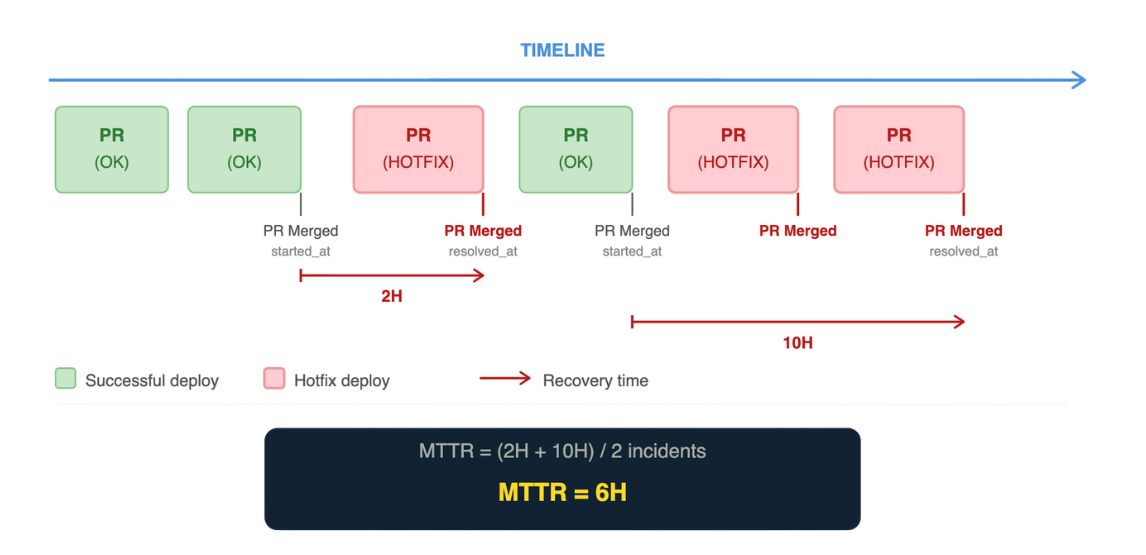
What data is tracked per incident
| Field | Description |
|---|---|
| Name | Incident name |
| Description | What happened |
| Repository | The affected repository |
| started_at | When the incident began (ISO 8601) |
| resolved_at | When it was resolved (ISO 8601) — if null, incident is considered active |
| detected_by | How it was detected: automated monitoring, customers, or internal |
How incidents affect your metrics
MTTR is calculated as the average of resolved_at - started_at across all resolved incidents. Active incidents with no resolved_at are excluded until resolved. The more incidents you track and resolve, the more accurate your MTTR becomes.
Change Failure Rate counts any deployment that required remediation as a failed deployment, regardless of how the incident was detected. See DORA Metrics for the full CFR calculation.
Track Incidents
Automatically detect incidents from branch naming conventions like hotfix/ or bugfix/.
Incident Management UILog resolved incidents or declare and track active incidents in real time via the DevStats interface.
Incidents APISubmit and update incidents programmatically from your existing tools.
PR RollbackAutomatically detect incidents from Revert PRs merged into the deploy branch, with no branch prefix configuration required.
DatadogAutomatically sync incidents from Datadog to feed CFR and MTTR in DevStats.