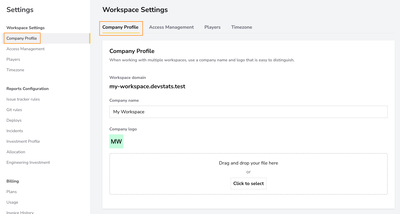
The Company Profile Settings page allows you to manage basic information about your company and customize your workspace for better identification and branding. This section is especially helpful when working with multiple workspaces, as it ensures clarity and consistency across your DevStats environment.
Features
Workspace Domain
- Displays your unique workspace domain (e.g.,
docu-agency.devstats.com).
- This is automatically generated and cannot be edited.
Company Name
- Enter the name of your company or organization in the text field (e.g., "Docu Agency").
- This name will be used throughout DevStats to represent your workspace.
Company Logo
- Upload a custom logo for your company to make your workspace easily distinguishable.
- How to upload: Drag and drop your logo file into the upload area. Alternatively, click the "Click to select" button to browse your device for the file.
- The uploaded image must be no larger than 1 MB. You can remove the current logo before uploading another one.