What is Branch Prefix Detection?
Branch prefix detection is the default method DevStats uses to automatically identify incidents from your Git provider. When a pull request is merged from a branch with a configured prefix, DevStats records it as an incident and uses it to calculate your Change Failure Rate (CFR) and Mean Time to Recovery (MTTR).
No manual input is required. As long as your team follows branch naming conventions, incidents are captured automatically.
Supported Prefixes
By default, DevStats detects the following prefixes:
| Prefix | Example branch |
|---|---|
hotfix/ |
hotfix/login-crash |
bugfix/ |
bugfix/payment-timeout |
Both can be enabled simultaneously or individually. Configuration is done in Settings → Incidents.
Hotfix vs Bugfix
While both prefixes are supported, we recommend using only hotfix/ as your incident convention. Here is why:
| Hotfix | Bugfix | |
|---|---|---|
| Purpose | Fixes a critical issue already in production | Fixes a non-critical issue for an upcoming release |
| Urgency | Immediate, deployed directly to production | Planned, part of a normal release cycle |
| Counts as incident | Yes | Not recommended |
| Affects MTTR | Yes | Inflates MTTR with non-critical fixes |
| Affects CFR | Yes | Inflates CFR with non-production failures |
Using bugfix/ as an incident prefix inflates both MTTR and CFR with fixes that were never production emergencies, making your DORA metrics less accurate.
How to Configure
1. Go to Settings → Incidents
2. Under Branch Prefix, select the prefixes you want to use as incident indicators:
- Hotfix + Bugfix: both prefixes count as incidents
- Hotfix only: recommended
- Bugfix only
3. You can apply the configuration globally or per repository.
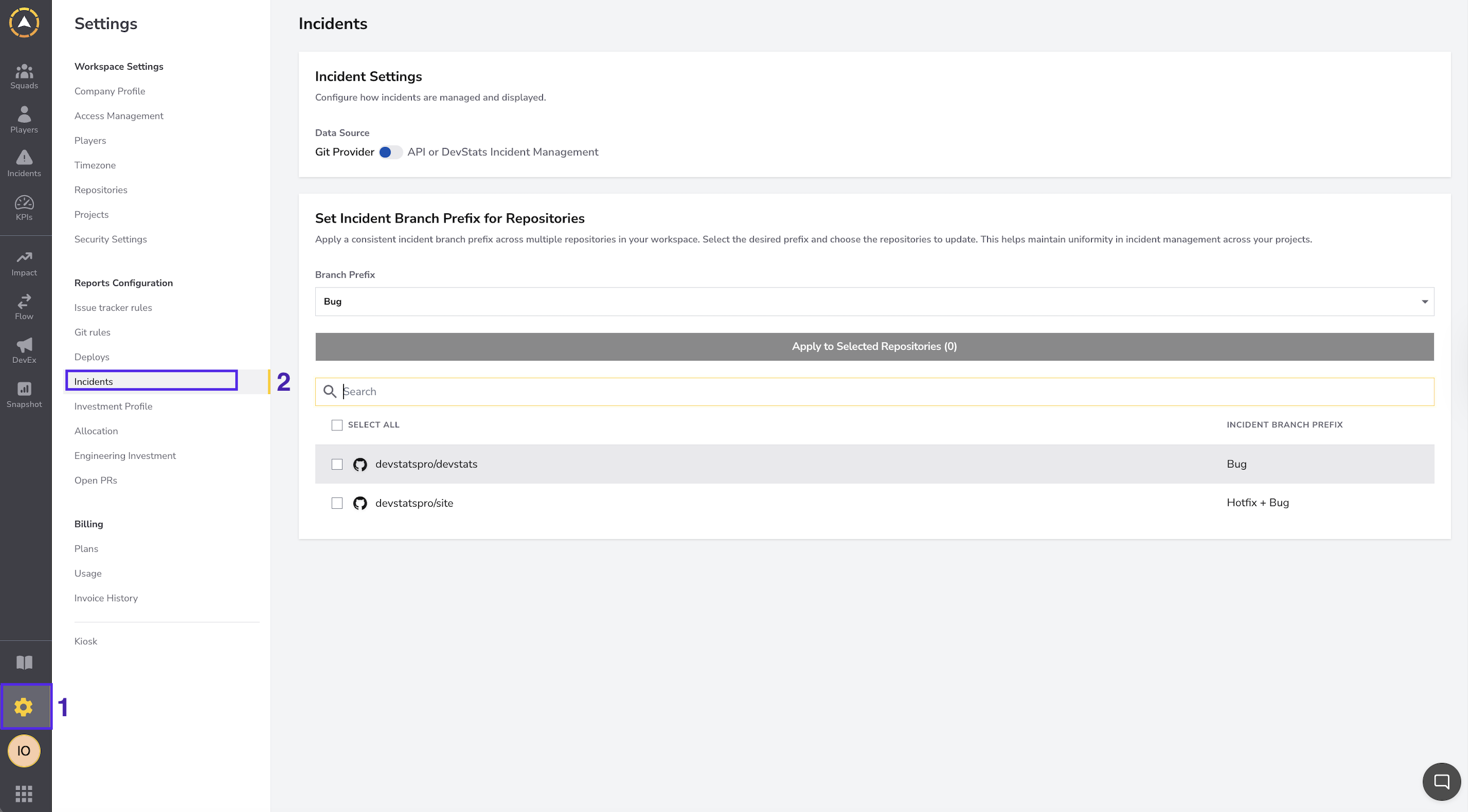
We recommend using Hotfix only to keep your MTTR and CFR metrics focused on real production incidents.