A well-balanced workload is essential for maintaining team productivity and preventing burnout. By using the Investment Profile feature, teams can monitor the distribution of tasks across different deliverable categories (e.g., features, enhancements, bugs, and hotfixes) to ensure the right balance between feature development, bug fixes, and scalability improvements.
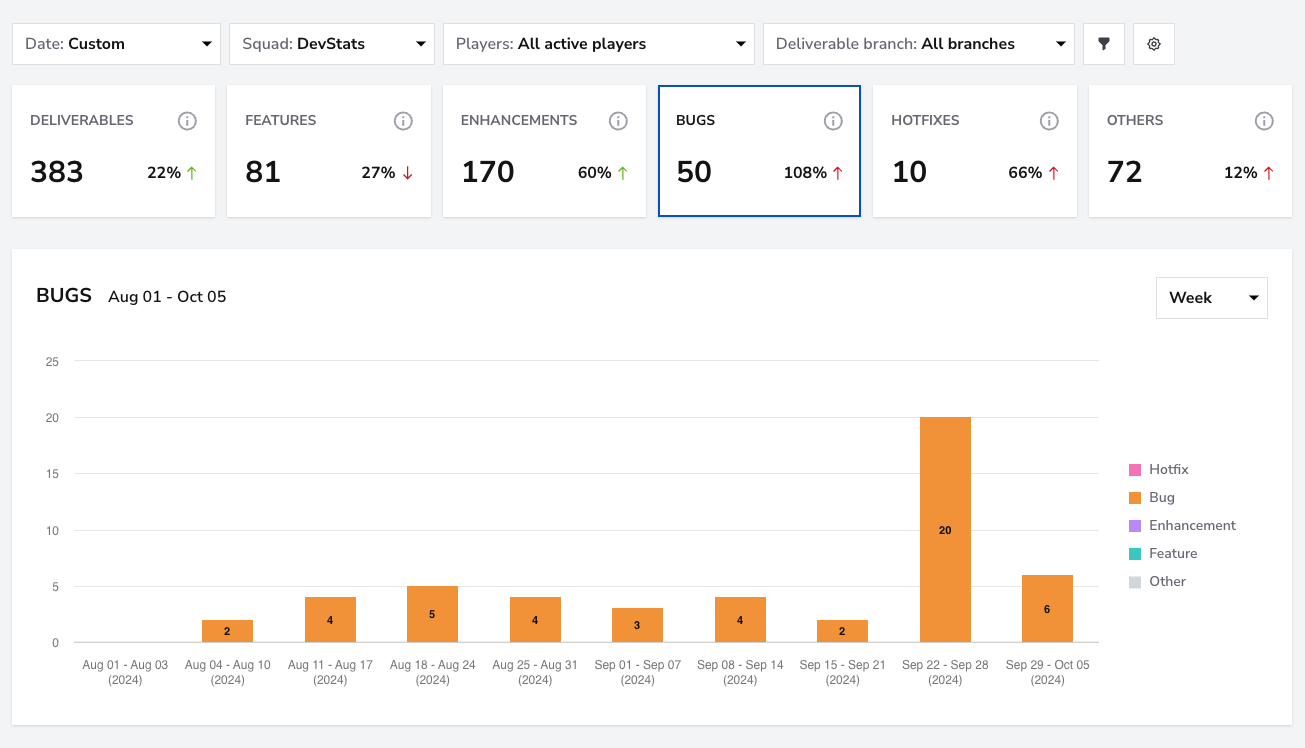
Step 1: Analyze the Distribution of Deliverables
- How: Start by reviewing the distribution of deliverables over a 90-day or year-long period. Look for patterns such as an increase in bug fixes or hotfixes, which could indicate underlying product stability or quality issues.
Step 2: Explore Different Projects
- How:To pinpoint where the high volume of bug fixes or hotfixes is coming from, use the repositoryor squads filter. This will help you identify specific teams or repositories that consistently show a high number of fixes, indicating areas that may need additional attention.
Step 3: Adjust Sprint Planning
If certain categories, like bugs or hotfixes, are consistently high, adjust sprint planning to allocate more resources toward resolving these issues. This can prevent future technical debt and improve overall product quality.
Step 4: Track Progress Over Time
Continuously monitor task distribution to identify trends and make adjustments to resource allocation as needed. Regularly reviewing this data helps ensure that no team or project is overloaded, promoting a balanced and efficient workload across the board.
Use the Investment Profile feature to track shifts in task distribution and assess their impact. Monitoring key metrics like hotfixes and bug fixes is essential, as a continuous rise or consistently high numbers in these areas may signal underlying issues that need attention.